
By USB A and USB C 2050
Basic Concepts and Design Differences
Performance and Function Comparison
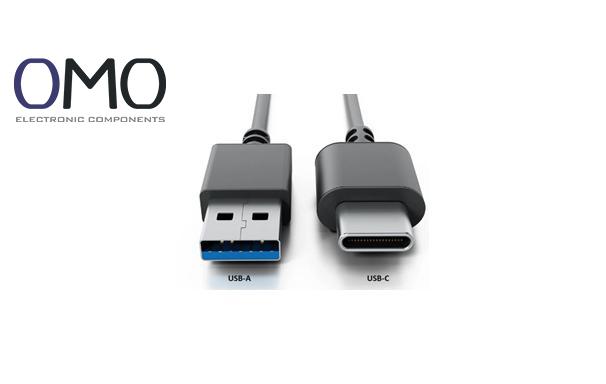
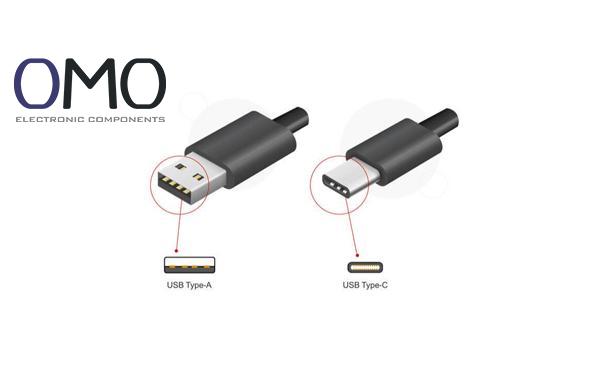
Since it was introduced in 1996 with the USB 1.0 standard, USB-A has become a “national-level interface” for electronic devices. It has a rectangular and one-way design. Users must check the correct side when plugging it in. At first, it supported low-speed devices like keyboards and mice. Today, it is still common in traditional accessories. Although its technology grows slowly, its low cost and large number of devices make it hard to replace.
USB-C was released in 2014. It has a rounded, symmetrical shape that ends the problem of “plugging the wrong way.” It has 24 pins and supports both sides for blind insertion. As a new universal interface, USB-C works with the USB protocol and supports extra features like Thunderbolt and DisplayPort. It is now standard in smartphones and slim laptops.
| Feature | USB-A | USB-C |
| Shape | Rectangular | Oval |
| Number of Pins | 4–9 pins | 24 pins |
| Plug-in Success Rate | About 75% | 100% |
Visual Tip: Imagine USB-A like a key that must match the lock, while USB-C is like a magnetic connector that works in any direction.
USB-A (under USB 3.1) supports up to 10Gbps. That’s enough to transfer a 4K movie in one minute. USB-C natively supports USB4, which offers 40Gbps. This is like upgrading a one-lane road to an eight-lane highway. It can transfer 8K uncompressed video in real time.
Traditional USB-A gives only 7.5W power, which is enough for slow charging phones. Some special protocols can reach 15W. But USB-C supports 100W standard power, enough to run a gaming laptop. The PD 3.1 (Power Delivery 3.1) protocol raises the limit to 240W, so it can replace old laptop chargers.
Today, one USB-C cable can connect a 4K display, gigabit network, and external SSD. Its DisplayPort Alt Mode supports two external 4K screens. The Thunderbolt protocol allows up to six devices to work as a workstation. USB-A cannot do all this in one cable.
Product Advantage Comparison 1:
Users of USB-C docking stations can save 87% of desk cable space. But USB-A hubs still need separate power and video cables.
USB-A’s mechanical design causes wear three times faster than USB-C (source: USB-IF test report). In thin laptops, USB-C’s compact design saves 40% of motherboard space. That’s one reason manufacturers prefer it.
In theory, USB-C’s bandwidth is 8 times higher than USB-A. USB-C also combines data transfer, video output, and fast charging in one port. USB-A needs three separate ports to do the same.
Even though USB-C devices grow 62% per year (2023 industry data), there are still over 5 billion USB-A devices in use. A good adapter helps old and new devices work together. One brand offers a 6-in-1 dock that supports USB-C at 40Gbps and USB-A at 10Gbps.
Product Advantage Comparison 2:
One flagship laptop switched fully to USB-C. Its charging time dropped by 58%. Traditional USB-A devices still need to carry extra chargers.
Pros:
Cons:
Pros:
Cons:
Visual Tip: If USB-A is like a basic mobile phone, USB-C is a smart terminal. One focuses on basic tasks; the other unlocks many new functions.
In 2024, USB4 may reach 45% market penetration. With E-Marker chips, smart cables can adjust voltage and current based on the device. One lab test showed the new USB-C negotiates 100W power in 0.3 seconds, five times faster than before.
EU’s new law could reduce 11,000 tons of e-waste yearly (source: EC report). Apple’s move to USB-C boosts the accessories market. One e-commerce platform saw a 320% increase in related product sales.
Car systems with USB-C charge 73% faster than traditional cigarette-lighter chargers. They also support screen mirroring between the central display and phone. One EV brand now uses a single USB-C port to control navigation, entertainment, and seat heating.
Product Advantage Comparison 3:
One brand’s USB-C monitor has a built-in KVM (Keyboard, Video, Mouse) function. It switches control between three computers with one cable. USB-A setups need six ports to do the same.
The USB-A and USB-C standards exhibit distinct variations in physical design, data transmission rates, charging capabilities, versatility, and industry adoption rates. While USB-C supports power delivery of up to 100W for device charging, USB-A ports generally provide a maximum power output of 7.5W.
In the absence of a USB-C port on your laptop, you can utilize the USB-A port to link multiple devices, including a mouse, keyboard, or printer.
Featuring an elliptical form, the USB-C interface typically employs robust plastic or metallic materials for its housing. This connector incorporates 24 contact points and enables simultaneous power transmission, high-speed data exchange, and display signal delivery. Its distinctive reversible design allows bidirectional insertion capability, eliminating orientation constraints during port connection.
USB-C, formally called USB Type-C, is an adaptable contemporary connector standard. This widely adopted technology serves as a universal port solution for mobile devices like phones, portable computers, tablets, and external accessories.
Certainly. You can utilize a USB-C connector or port converter to adapt one of your laptop's current ports into a USB-C interface. Alternatively, a USB hub offers the ability to connect several devices simultaneously through a single laptop port.